The first time a Super Nintendo racetrack turned beneath you, it was easy to forget the television was flat.
That feeling appeared elsewhere, too: backgrounds sliding past at different speeds, richer colors, and music that seemed to give a place its own atmosphere. The leap from NES to SNES was something you could recognize without knowing a single specification.
Open the box conceptually, and that leap becomes a story about sharing the work. The main CPU ran the game, graphics hardware assembled the picture, a separate audio subsystem handled sound, and some cartridges brought extra processors of their own.

The picture’s ingredients have different homes: VRAM holds tile graphics and background maps, OAM describes sprites, and CGRAM supplies color values. The PPU combines the prepared pieces. The audio CPU and DSP work with their own audio RAM. Those distinctions are why “16-bit” alone tells you very little about a whole scene. See SNESdev’s PPU comparison and the audio subsystem reference.
The CPU was only part of the story
At the center of the SNES is the Ricoh 5A22, with a CPU core derived from the 65C816 family. Its ancestry connects it to the 6502-derived processor in the NES, but that does not make the SNES compatible with NES cartridges.
Even its clock speed needs context. On an NTSC system, CPU cycles take different amounts of time depending on the operation and memory region being accessed. The commonly quoted rates are approximately 3.58, 2.68, and 1.79 MHz; “3.58 MHz” alone does not describe every access. SNESdev’s timing reference explains the six-, eight-, and twelve-master-clock cycles.
Comparing consoles by one clock number misses the larger design. What work can the graphics hardware do? How does data get to it? Can sound continue without the main CPU generating every note itself? Those questions get closer to what the player actually experiences.
More memory meant more room to work
The SNES has 128 KB of main work RAM, compared with the NES’s 2 KB of internal CPU RAM. That is sixty-four times the temporary workspace, although it is not a sixty-four-fold measure of overall performance.
It also has 64 KB of video RAM and a separate 64 KB of audio RAM. These are distinct pools with different jobs, rather than one large bucket a developer can divide however they please. The hardware layout is documented in Martin Korth’s Fullsnes reference.
More working space gives game code room for object state, temporary calculations, buffers, and other information. It does not design a better game by itself. It gives developers more room to implement one.

Layers made flat worlds feel deeper
Like the NES, the SNES builds much of its picture from tiles. What changes is how flexibly those pieces can be combined.
Different background modes offer different combinations of layers, color depth, and resolution. Mode 1, a common choice, provides two 4-bit-per-pixel backgrounds and a third 2-bit-per-pixel background. That corresponds to 16 and four palette indices per tile, respectively, with one index serving as transparent—not a limit of only 16 colors across the entire layer. SNESdev’s background-mode guide explains those arrangements.
Independent scrolling is the part your eyes care about. Move nearby scenery quickly and distant scenery slowly, and a flat display begins to suggest distance. Artists can also use foreground elements and priorities to place the player within a scene.
It is the same screen, but there is more happening between its apparent front and back. The hardware supplies the layers; the composition makes them feel like a place.
What Mode 7 actually does
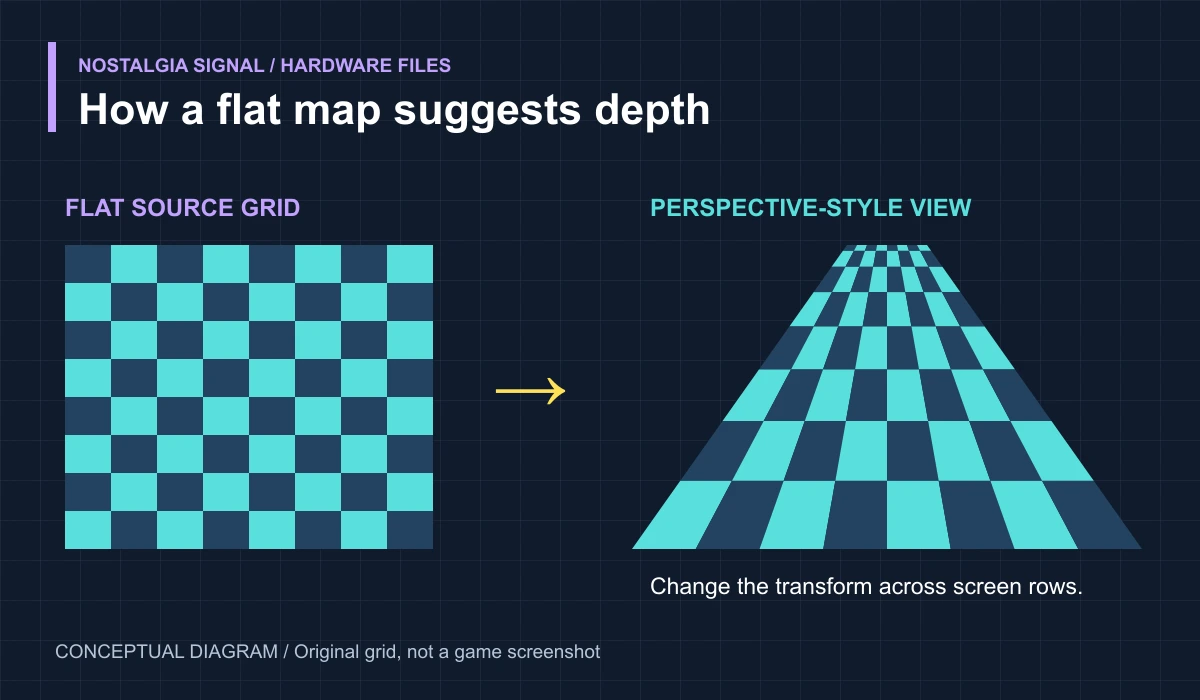
Mode 7 transforms a flat background. It can rotate, scale, and otherwise remap that background through an affine transformation. It does not, by itself, turn a map into a landscape made of 3D polygons.
Change the transformation parameters from one scanline to the next, and the picture can suggest perspective: the ground appears compressed near the horizon and larger near the bottom of the screen. SNESdev documents the transformation; its HDMA examples show how register updates can vary across scanlines.
That distinction makes the effect more interesting. A road does not need to exist as a fully modeled 3D object to convince you it is rushing underneath the vehicle. Correctly arranged movement gives your eyes enough information to do the rest.
It also helps to distinguish two famous effects. A rotating background is a use of the base SNES graphics hardware. Polygonal scenes assisted by a Super FX chip involve additional processing hardware in the cartridge. They are different routes to a convincing picture.
More color than a single number suggests
The SNES uses 15-bit color: five bits each for red, green, and blue, giving 32,768 possible color values. Its palette memory, CGRAM, holds 256 entries at a time. SNESdev’s palette reference explains the storage format.
Those numbers describe different things. The available color space is not the same as the current palette, and the current palette is not a complete account of every final pixel. Graphics modes, transparency, and color math affect how the image is composed.
For a player, the practical result is expressive shading and scenes with a much wider visual range. For an artist, it is a larger set of choices that still has to fit the hardware’s rules.
The music had its own computer
The SNES audio subsystem includes an SPC700-based processor, 64 KB of audio RAM, and a digital signal processor with eight voices. The main CPU communicates with it, but the sound side runs its own program. SNESdev’s S-SMP reference describes the components.
Those voices can play compressed samples: brief recordings that can be pitched, shaped, mixed, and used as musical building blocks. A short instrument sound can become many different notes. The DSP register reference documents controls such as pitch and volume.
The memory budget still forces decisions. Audio RAM has to accommodate the sound program and its data as well as samples and, when used, an echo buffer. A sweeping soundtrack is not evidence of an unlimited recording studio hiding inside the console.
That is part of its character. Instrument choices, compact samples, and the way they are processed all contribute to the sound we associate with the system. The technology offers a palette; composers give it a mood.
DMA moved the pieces; HDMA changed the picture
Picture data has to reach the graphics hardware. Doing every transfer through a long sequence of ordinary CPU instructions would consume time that game code needs elsewhere.
DMA, or direct memory access, moves blocks of data using dedicated hardware. During normal SNES DMA, the main CPU pauses rather than continuing to execute the game in parallel. The transfer is efficient, but it is not free CPU time. Video-memory access still has timing restrictions. SNESdev’s DMA register guide documents the transfer system.
HDMA performs small transfers associated with horizontal blanking, between displayed scanlines. Games can use those updates to change scroll values, colors, or transformation parameters across the picture. The resulting gradients and distortions can look far more elaborate than the individual register changes behind them.
Sometimes the game brought another processor
The cartridge remains connected while the game runs. It can contain program data, save memory, and—in some games—additional processing hardware.
DSP-1 variants used by games such as Pilotwings and Super Mario Kart assist mathematical work. The Super FX family provides a different kind of processing help; Star Fox is its famous early example. These chips are not interchangeable, and most SNES games do not depend on a Super FX chip. Fullsnes documents the cartridge processors and their game usage.
Buying one of those cartridges meant plugging in additional hardware along with the software. The console on the shelf had not changed, but the complete system available to that particular game had.
Why we remember the worlds
The SNES did not eliminate limits. It distributed the work, expanded the available tools, and gave developers more ways to shape the result.
You did not need to know that a sound program was running in separate memory. You heard the music. You did not need to identify the background mode. You felt the track turning beneath you.
Understanding the machinery gives those memories another dimension. Behind the atmosphere was a chain of very specific decisions about memory, timing, images, and sound. The worlds felt effortless because someone had worked hard to make the effort disappear.
Hardware scope: CPU timing examples here describe NTSC systems. Region, board revision, graphics mode, and cartridge hardware affect the details.
Cover photograph: Evan-Amos, public domain. Original photograph on Wikimedia Commons. Diagrams: NostalgiaSignal.